
In today’s fast-paced business landscape, the shift toward remote and hybrid work has become the new standard. However, as any experienced business coach will tell you, simply allowing your employees to work from home does not guarantee success. While strong leadership, emotional intelligence, and continuous training are the foundation of a high-performing team, the right technology acts as the critical scaffolding that holds it all together.
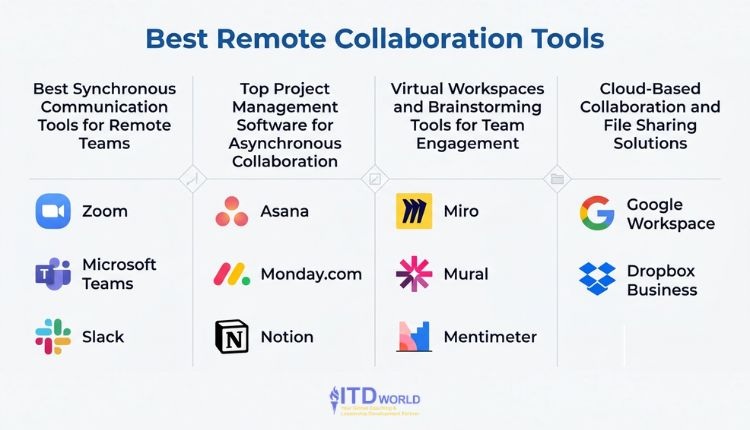
To overcome remote work challenges and foster true virtual team engagement, it is crucial that organizations equip their people with the right digital workplace ecosystem. Below, we explore the best remote collaboration tools for distributed teams across four essential categories, helping your organization communicate clearly, execute flawlessly, and maintain a vibrant company culture from anywhere in the world!
 |
Author: Jonathan M. Pham |
Best Synchronous Communication Tools for Remote Teams
Synchronous communication—interacting in real-time—is vital for building rapport, holding coaching sessions, and making rapid decisions. Here are the leading platforms connecting distributed teams face-to-face and screen-to-screen.
-
Zoom
Overview of Features: Zoom remains the gold standard for high-quality video and audio conferencing. It offers meeting recording, screen sharing, live transcriptions, and interactive features like polling and whiteboards.
What Makes It Stand Out: Zoom’s “Breakout Rooms” feature is exceptionally valuable for business training and corporate workshops, allowing facilitators to seamlessly split large audiences into smaller, focused discussion groups.
Notable Points to Take Into Account: While highly reliable, “Zoom fatigue” is a real phenomenon. Leaders shoudl be mindful of balancing on-camera meetings with asynchronous work to prevent employee burnout.
-
Microsoft Teams
Overview of Features: Built as a comprehensive hub for teamwork, Microsoft Teams combines video conferencing, workplace chat, and file collaboration into one centralized platform.
What Makes It Stand Out: Its seamless, deep integration with the broader Microsoft 365 ecosystem (Word, Excel, PowerPoint, SharePoint). Users can co-author documents in real-time without ever leaving the Teams interface.
Notable Points to Take Into Account: Because it is an enterprise-grade, all-in-one solution, the interface may feel overwhelming for smaller teams or those not already entrenched in the Microsoft ecosystem.
-
Slack
Overview of Features: Slack is a channel-based messaging platform designed to replace email for internal communication. It allows teams to organize conversations by project, department, or topic.
What Makes It Stand Out: Slack’s superpower is its integration capability. It connects with thousands of other business apps (like Google Drive, Salesforce, and Asana), enabling teams to receive notifications and take action without switching tabs.
Notable Points to Take Into Account: The expectation of instant replies may give rise to a culture of constant interruption. Managers should establish clear guidelines on response times and encourage the use of “Do Not Disturb” statuses for deep work.

Best remote collaboration tools
Top Project Management Software for Asynchronous Collaboration
To scale effectively, teams need to master asynchronous communication—moving work forward without requiring everyone to be online at the same time. The right project management software ensures total visibility into who is doing what, and by when.
-
Asana
Overview of Features: Asana is a highly intuitive project and task management tool. It allows teams to visualize their work through lists, kanban boards, timelines, and calendars.
What Makes It Stand Out: The “Goals” feature directly connects daily tasks to overarching company objectives. From a business coaching perspective, this is invaluable for ensuring strategic alignment from the C-suite down to individual contributors.
Notable Points to Take Into Account: While the basic version is free, unlocking advanced features like custom rules, timeline views, and portfolio tracking requires a premium tier, which may become costly for larger organizations.
-
Monday.com
Overview of Features: Monday.com is a highly visual, modular Work OS (Work Operating System). Users can build custom workflows for anything from HR onboarding and CRM to software development and marketing campaigns.
What Makes It Stand Out: Its automation capabilities are top-tier. You can easily set up “If this, then that” automations (e.g., “If a task status changes to ‘Done’, notify the project manager”), which vastly reduces manual busywork.
Notable Points to Take Into Account: Because it is essentially a blank canvas, setting up Monday.com efficiently requires upfront planning. A designated administrator is highly recommended to architect the initial workflows.
-
Notion
Overview of Features: Notion is an all-in-one workspace that blends note-taking, document collaboration, wikis, and project management into a single, highly flexible interface.
What Makes It Stand Out: It acts as the ultimate “single source of truth.” You can embed a project kanban board directly inside a meeting notes document, which is linked to your company’s core policy wiki.
Notable Points to Take Into Account: Notion’s extreme flexibility is a double-edged sword. Without strict organizational governance and standardized templates, a company’s Notion workspace can quickly become a disorganized labyrinth.

Best remote collaboration tools
Virtual Workspaces and Brainstorming Tools for Team Engagement
Innovation suffers in remote environments if teams cannot brainstorm organically. Virtual whiteboarding tools recreate the magic of a conference room filled with sticky notes and markers.
-
Miro
Overview of Features: Miro is an infinite-canvas visual collaboration platform. It offers digital sticky notes, drawing tools, flowcharts, and mind-mapping capabilities.
What Makes It Stand Out: Its extensive library of pre-built templates. Whether you are running an agile sprint retrospective, a customer journey mapping session, or a strategic SWOT analysis, Miro has a ready-to-use framework.
Notable Points to Take Into Account: Navigating an infinite canvas may prove tricky for first-time users. Facilitators should spend the first five minutes of any workshop teaching participants how to zoom and pan effectively.
-
Mural
Overview of Features: Similar to Miro, Mural is a digital workspace for visual collaboration, heavily favored by design thinkers, agile coaches, and corporate trainers.
What Makes It Stand Out: Mural includes powerful “Facilitation Superpowers.” Meeting leaders can summon all users to their exact view on the board, lock specific elements to prevent accidental deletion, and trigger a laser pointer to guide attention.
Notable Points to Take Into Account: It is distinctly optimized for synchronous workshops and guided meetings. For purely asynchronous diagramming or individual brainstorming, it might be more tool than necessary.
-
Mentimeter
Overview of Features: Mentimeter is an interactive presentation tool with which presenters can insert live polls, word clouds, quizzes, and Q&As directly into their slides.
What Makes It Stand Out: It is the ultimate antidote to disengaged remote audiences. By allowing team members to submit anonymous feedback via their smartphones during a presentation, leaders can take the true “pulse” of the room without putting anyone on the spot.
Notable Points to Take Into Account: While fantastic for audience engagement and large all-hands meetings, it is generally not a tool for deep, complex project collaboration.

Best remote collaboration tools
Cloud-Based Collaboration and File Sharing Solutions
A digital workplace is only as strong as its filing system. Secure, cloud-based collaboration ensures that version-control nightmares become a thing of the past.
-
Google Workspace (Drive, Docs, Sheets)
Overview of Features: Google Workspace provides a suite of cloud-native productivity apps designed around collaboration from day one, rather than as an afterthought.
What Makes It Stand Out: The real-time co-authoring is practically flawless. Multiple team members can type in a single document or spreadsheet simultaneously, viewing each other’s cursors in real-time, completely eliminating the need to email attachments back and forth.
Notable Points to Take Into Account: If your clients or external partners rely heavily on complex, macro-heavy Microsoft Excel or legacy Word formatting, converting those files into Google formats may sometimes result in formatting errors.
-
Dropbox Business
Overview of Features: Dropbox Business is a robust cloud storage solution that syncs files across devices and allows for secure sharing both internally and externally.
What Makes It Stand Out: It handles massive file sizes (like high-res video, raw audio, or large graphic design files) with incredible speed and reliability compared to its competitors. The “Dropbox Replay” feature also allows for time-stamped comments directly on video and audio files.
Notable Points to Take Into Account: Unlike Google Workspace or Microsoft 365, Dropbox does not have its own native suite of robust word processors or spreadsheets, meaning you will need to pair it with other software.
Best remote collaboration tools
FAQs
How do remote collaboration tools improve team productivity?
By centralizing information and streamlining communication. The right team productivity software eliminates data silos, clarifies task ownership, and reduces the time employees spend searching for files or waiting on email replies, allowing them to focus on high-impact work.
What are the best asynchronous communication tools for businesses?
Project management tools like Asana and Monday.com, alongside centralized wikis like Notion, are exceptional for asynchronous work. With them, team members across different time zones can log in, see exactly what transpired while they were offline, and seamlessly pick up where others left off.
How can leaders choose the right team productivity software?
Before purchasing new software, assess your team’s specific bottlenecks. Do you struggle with alignment? Look into Asana. Are your meetings unengaging? Try Miro or Mentimeter. Always prioritize tools that integrate well with the software you already use to avoid creating workflow friction.
Read more: Employee Performance Checklist – A Framework for High-Impact Reviews
Bridging the Gap Between Technology and Leadership
Implementing the best remote collaboration tools is a crucial step in cultivating a resilient distributed team. However, software alone cannot fix poor communication habits, a lack of trust, or unclear expectations. Tools only amplify the culture and leadership that already exist.
To truly maximize the potential of your distributed workforce, leaders need to be trained to manage by outcomes rather than hours, foster psychological safety over video calls, and build processes optimized for the digital age.
ITD World provides specialized coaching and training solutions designed to help leaders & organizations secure a competitive advantage – and be equipped to win in today’s dynamic landscape. Contact us today to learn more about our world-class programs!
Other resources you might be interested in:
- Executive Presence on Video Conference Calls: How to Master It
- How AI is Revolutionizing the Employee Experience (EX)
- Cross-functional Collaboration: Guide to Silo Busting in Large Organizations
- Employee Engagement in the Digital Age
- Microlearning: How to Build a High-Impact, Bite-Sized L&D Strategy
- Human Leadership in a Digital World: Skills & Strategies for Sustainable Success