

For decades, leadership and influence were measured in boardrooms. We learned to read a room, utilize the physical space, and leverage subtle physical cues to project authority. Today, the boardroom has largely shifted to Zoom, Microsoft Teams, and WebEx. But make no mistake: the stakes for “executive presence” remain just as high.
Whether you are pitching a multi-million-dollar investment, rallying an internal team, or closing a key client, your audience isn’t just buying a product or a strategy. They are buying your ability to lead, represent the brand, and navigate complex environments.
However, screens have a “flattening” effect. They compress our natural energy and strip away physical nuances. To command a virtual room, leaders need to intentionally adapt their approach. Mastering virtual executive presence has now become an inside-out, modern-day survival skill that combines technical excellence, physical discipline, and high emotional intelligence.
 |
Author: Jonathan M. Pham |
Highlights
- Virtual executive presence is the ability to project authority and reliability through a digital interface.
- High-quality audio and intentional lighting are critical signals of professionalism. Investing in an external microphone avoids “tinny” sound that erodes authority, while facing a light source (rather than being backlit) projects transparency and openness.
- Because digital mediums dampen energy, leaders should speak decisively, eliminate apologetic language, and use “The Pause” instead of filler words. To maintain engagement, speak at a slightly faster pace than usual but utilize a lower vocal range to sound more authoritative.
- True eye contact is simulated by looking directly into the camera lens rather than at the faces on the screen. Additionally, framing yourself with only an inch of headroom—the “News Anchor” crop—ensures you appear empowered rather than diminished by the frame.
- Executive presence is defined by how you react to technical glitches or interruptions. Remaining calm and composed during a “tech fail” demonstrates high-pressure leadership skills, whereas panicking destroys your perceived groundedness.
- To prevent remote participants from being marginalized, leaders must act as active facilitators by explicitly inviting input and “equalizing the room” (asking in-person attendees to turn on their individual laptop cameras for better visibility of micro-expressions).
What is Virtual Executive Presence? (Translating Gravitas to the Screen)
The answer goes beyond having a nice webcam. It is your ability to inspire confidence, project poise, and communicate reliability—even when you are reduced to a small square on a screen.
True executive presence carries psychological weight. It is “when you’re not in the room” leadership; a lingering sense of authority that ensures your guidance is felt long after the call ends.
To understand why executive presence matters in remote work, we have to look at the science of first impressions. According to Dr. Albert Mehrabian’s famous 7-38-55 rule, only 7% of meaning is communicated through spoken words. A staggering 38% is conveyed through tone of voice, and 55% through body language.
The difference between in-person and digital body language is that digital mediums inherently obscure that 93% of non-verbal communication. If your visual and vocal cues are weak, shadowed, or muffled on a video call, you lose nearly all your communicative power.
You cannot rely on physical proximity to build trust; you have to deliberately engineer it.

Executive presence on video conference calls
The 3 Pillars of Executive Presence in a Digital World
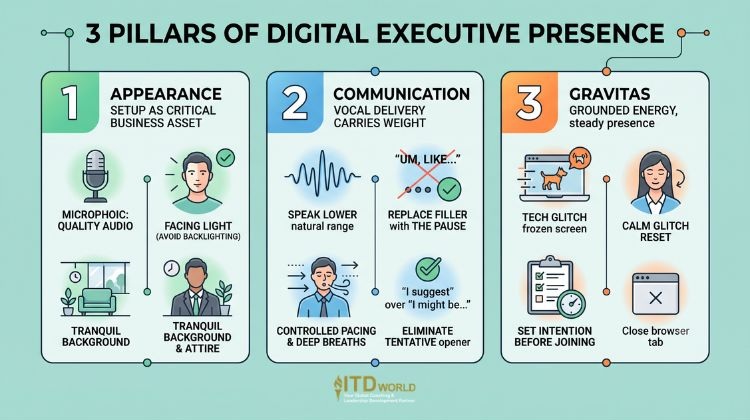
Building trust through virtual communication requires mastering three distinct pillars: Appearance, Communication, and Gravitas.
-
Appearance: Nailing Your Setup (Lighting, Framing, and Audio)
Your technical environment is the immediate proxy for professional competence. It’s essential to treat your setup as a critical business asset.
-
Audio as a Proxy for Credibility
In the digital age, your audio quality is your presence. Built-in computer microphones and standard wireless earbuds are afterthoughts that often compress your voice, making you sound distant or “tinny.” This subconsciously undermines your authority.
The rule of thumb is to invest in a dedicated, high-quality external microphone or headset ($50 to $150+). To prove you can lead a major initiative, you have to be willing to invest in audio quality.
-
Lighting is a Trust Signal
The human brain is wired to feel uneasy when it cannot clearly see someone’s face. Sitting in front of a bright window (backlighting) casts you in shadows, making you look like you are in “witness protection.” Poor lighting subconsciously signals concealment.
Conversely, ring light/three-point lighting or sitting facing a natural light source projects transparency and openness.
-
Background Aesthetics and Attire
Avoid digital, 1990s-style virtual backgrounds, as these frequently glitch around your edges and look amateurish. Opt for a tranquil, physical background.
Aside, make sure to honor the hierarchy of attire. Research shows that an “unkempt” appearance heavily penalizes perceived leadership. Dress for your audience, not your location—a role-aligned wardrobe ensures your appearance is a non-distraction.

Executive presence on video conference calls
-
Communication: Mastering Vocal Variety and Pacing
Because screens dampen energy, your vocal delivery must carry the weight of the room.
-
Technical Optimization
Video conferencing software often compresses higher frequencies. To sound authoritative, intentionally speak at the lower end of your natural vocal range.
-
Combating the “Webinar Risk”
Virtual speakers often fall into a “stream of consciousness” trap because they lack immediate visual feedback from an audience. The result is rambling sentences connected by endless filler words, which is mentally exhausting for the listener.
To solve this “period problem,” replace filler words with The Pause. Strategic silence sharpens your public speaking impact and signals that your words carry weight.
-
Eliminating Tentative Language
To build authority, drop apologetic openers (“I might be off base here, but…”). Speak decisively.
-
Pacing
Interestingly, virtual attention spans are significantly shorter than in-person ones. The solution is to speak slightly faster than you would in a physical boardroom to maintain momentum, but take deep, full breaths between thoughts. Rushing without breathing leads to vocal fry (a gravelly tone) or uptalk (ending statements like a question), both of which erode authority.
-
Gravitas: Projecting Calm, Confidence, and Competence
Gravitas is about grounded energy. As a leader, your primary job on a call is to provide a “steadying” presence.
-
Reaction Over Reality
Virtual communication is fraught with technical failures, barking dogs, and frozen slides. Executive presence is not defined by the absence of these disruptions, but by how you react to them. When a tech glitch occurs, panicking or becoming visibly flustered destroys your gravitas.
A calm, composed reset is a direct demonstration of how you handle high-pressure executive situations.
-
The Pre-Flight Intention Check
Before clicking “Join,” take a moment to intentionally cast yourself in the role you need to play. Close distracting browser tabs, take a breath, and decide the specific energy—whether it’s empathy, command, or innovation—that the current meeting requires.
Read more: Unnecessary Meetings – Ending the Invisible Tax on Your Team’s Performance
Executive presence on video conference calls
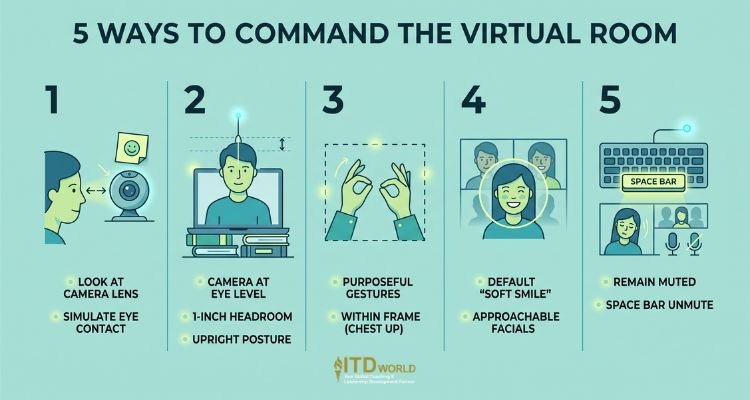
Digital Body Language: 5 Ways to Command the Virtual Room
-
The “Camera-Eye” Rule (Simulating True Eye Contact)
In a physical room, eye contact builds trust. Yet on a screen, looking at the faces of your colleagues means you are looking down at your monitor, breaking eye contact with them.
To simulate a digital handshake, you should practice sustained eye contact by looking directly into the camera lens. The 99/1 Rule is especially helpful here: when you are delivering a key persuasive point, look at the lens 99% of the time, and only glance down 1% of the time to read the room.
Pro Tip: Staring at a tiny glass lens may feel unnatural. Place a sticky note with a hand-drawn smiley face (or a small photo of a loved one) directly above the webcam. This humanizes the hardware and triggers warm, natural micro-expressions.
-
Posture and Framing (The “News Anchor” Crop)
Where you position yourself in the frame dictates your perceived power.
-
The “One-Inch” Camera Rule: Adjust your camera framing so there is only about one inch of space between the top of your head and the top of the video frame. Having too much headroom shrinks you, making you look disempowered—like a child sitting at the grown-ups’ table.
-
Camera at Eye Level: Elevate your laptop on books or a stand. Looking down at the camera makes you appear arrogant or looming, while looking up conveys submissiveness.
-
The “Invisible String” Technique: Slumping is perceived as a lack of alertness. To project ease and authority, imagine an invisible string pulling the top of your head toward the ceiling, while consciously dropping your shoulders down.
-
Using Hand Gestures Effectively on Screen
Unlike in-person speaking where broad movements are encouraged, on video, erratic hands may be highly distracting. Keep your gestures purposeful and within the frame (from the chest up). Avoid the “Bobbing Fail”—where your hands flicker in and out of the bottom edge of the screen like a nervous tic. Additionally, try not to point or move your hands directly toward the lens, as the wide-angle distortion will make them appear aggressively large.
-
The “Always On” Rule and Facial Expressions
In Gallery View, people can see you even when you aren’t speaking. One of the main drivers of Zoom fatigue is attempting to constantly decode blank facial expressions. Hence, you should maintain a “soft smile” (slightly lifted cheeks and eyes) as your default resting face. This makes you approachable and highly engaged.
Note: Match your non-verbal cues to your message. Drop the smile immediately if you are delivering somber or critical news.
-
The “Space Bar” Insurance Policy and Active Listening
To project professionalism and practice microphone etiquette, remain muted when not speaking to eliminate background noise. In platforms like Zoom, you can hold down the space bar to temporarily unmute yourself to chime in. While listening, use visible active listening cues—nodding deliberately—so the speaker knows you are engaged and not answering emails on a second monitor.
Executive presence on video conference calls
Common Mistakes That Sabotage Your Virtual Authority
Even the most seasoned leaders can have their brand knocked down a few pegs by casual, work-from-home habits. Protect your professional reputation by avoiding these hazards:
-
The Bedroom is “TMI”: Conferencing from a bed or showing a messy bedroom is highly unprofessional because it erodes the boundary between private and professional life. If you lack a dedicated home office, purchase an inexpensive physical folding screen to place behind you.
-
The “Mug” Strategy: Double-fisting water bottles or drinking from branded sports jugs distracts the viewer. Maintain a polished image by pouring all your beverages (water, coffee, etc.) into a simple, opaque, professional mug.
-
The “No Pants” Risk: We’ve all heard the cautionary tales. If you must leave your seat to grab a file or close a door, turn off your camera before standing up.
-
Notification Pings: Some professionals leave their Slack or email notifications unmuted, assuming the constant pinging makes them look “busy and important.” However, it only signals a lack of respect for the people in the current meeting. Turn on ‘Do Not Disturb’ instead.
-
The “Ending” Trap: The moments after you finish speaking are just as vital as the speech itself. Dropping your confident posture, exhaling heavily, or squinting as you scramble to find the “Leave Meeting” button destroys the gravitas you just built. Maintain your composure until the screen goes fully black.
How to Lead Hybrid Meetings Without Losing the Remote Team
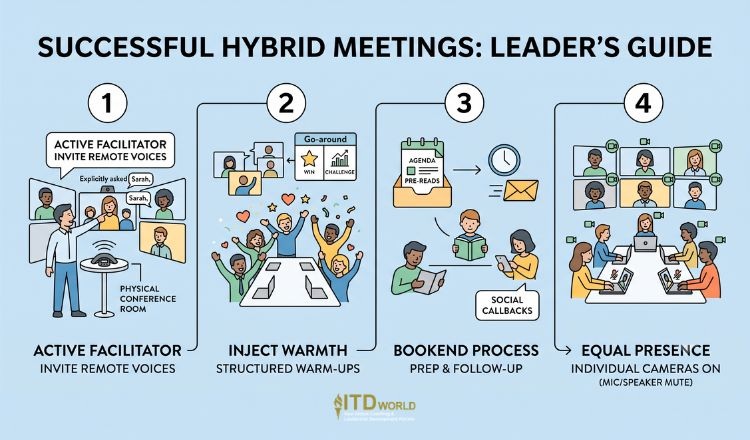
Leading hybrid meetings with confidence is one of the most complex challenges in modern management. When half the team is in a physical conference room and the other half is on screens, remote workers are easily marginalized.
- The “Room Facilitator” Role:
As the leader, you must step into the role of active facilitator. It is notoriously difficult to “read the room” digitally. You must explicitly invite quieter remote members into the conversation (“Sarah, we haven’t heard from you yet—what are your thoughts on this timeline?”).
- Combating the “Ritual Void”:
In a physical office, culture is built in the margins—the chat while walking to the boardroom, the water cooler banter. Virtual environments have a “ritual void.”
You need to artificially inject warmth to build comradery. Start meetings with structured “go-arounds” (e.g., asking each person to share one quick professional win and one challenge).
- The Inbox and Follow-Up “Bookends”:
Remote leadership is a comprehensive strategy that begins before the camera turns on. Establishing authority starts in the inbox by sending a clear agenda and pre-read materials (to respect your team’s cognitive load). Presence is then cemented after the call with a rapid follow-up email. Use “Social Callbacks” in these follow-ups—mentioning a participant’s favorite sports team or vacation plan discussed during the warm-up chat—to prove you were actively listening.
- Equalizing the Room:
If you have a hybrid team, avoid the “bowling alley” camera view where remote workers just see a long table of tiny, indistinguishable faces. Have every in-person attendee open their own laptop and turn their camera on (with their microphones and computer speakers muted to prevent feedback). This gives remote workers access to the same micro-expressions and direct engagement as everyone else.
Read more: Employee Engagement in the Digital Age
Executive presence on video conference calls
FAQs
How can remote leaders prevent themselves from being talked over?
In virtual formats, audio lag makes natural interjection difficult, leading to constant interruptions. To hold the floor, use enumerating language right from the start. For example, instead of just launching into an explanation, say, “I have three core reasons for this strategy. First…”
If someone interrupts you after the first point, you have a logical, polite hook to reclaim the floor by saying, “I appreciate that, let me just finish my second and third points so we have the full context.”
How do you project confidence when you are sitting down on a video call?
When seated, people naturally tend to slump, which restricts diaphragm breathing and signals low energy. To project confidence, sit on the front half of a structured chair (like a dining chair, never a couch). Use the “invisible string” technique to keep your spine straight, lean slightly forward toward the lens to metaphorically “fill the space,” and ensure your camera is cropped from the mid-chest up so your intentional hand gestures remain visible.

Executive presence on video conference calls
Final Thoughts
Your virtual executive presence is your digital workplace brand. By taking control of the technical environment, dialing up your behavioral cues, and leading with empathetic, structured communication, you can turn a rigid video grid into a dynamic platform for true leadership.
ITD World provides specialized coaching and training solutions designed to help leaders & organizations secure a competitive advantage – and be equipped to win in today’s dynamic landscape. Contact us today to learn more about our world-class programs!
Other resources you might be interested in:
- Visibility at Work: Key to Sustainable Career Advancement
- Virtual Reality in Training and Development: How Immersive Technology is Rewriting the Rules of Corporate Coaching
- Introverted Leadership: Beyond the Stereotype